
ORKENTY PLATFORM
One ALM platform.
Your engineering context, connected.
From requirements to release: organize work, connect quality and preserve evidence. Explore Orkenty capabilities and how they fit your team’s process.
EXPLORE THE PLATFORM
Connect decisions to work.
And work to its evidence.
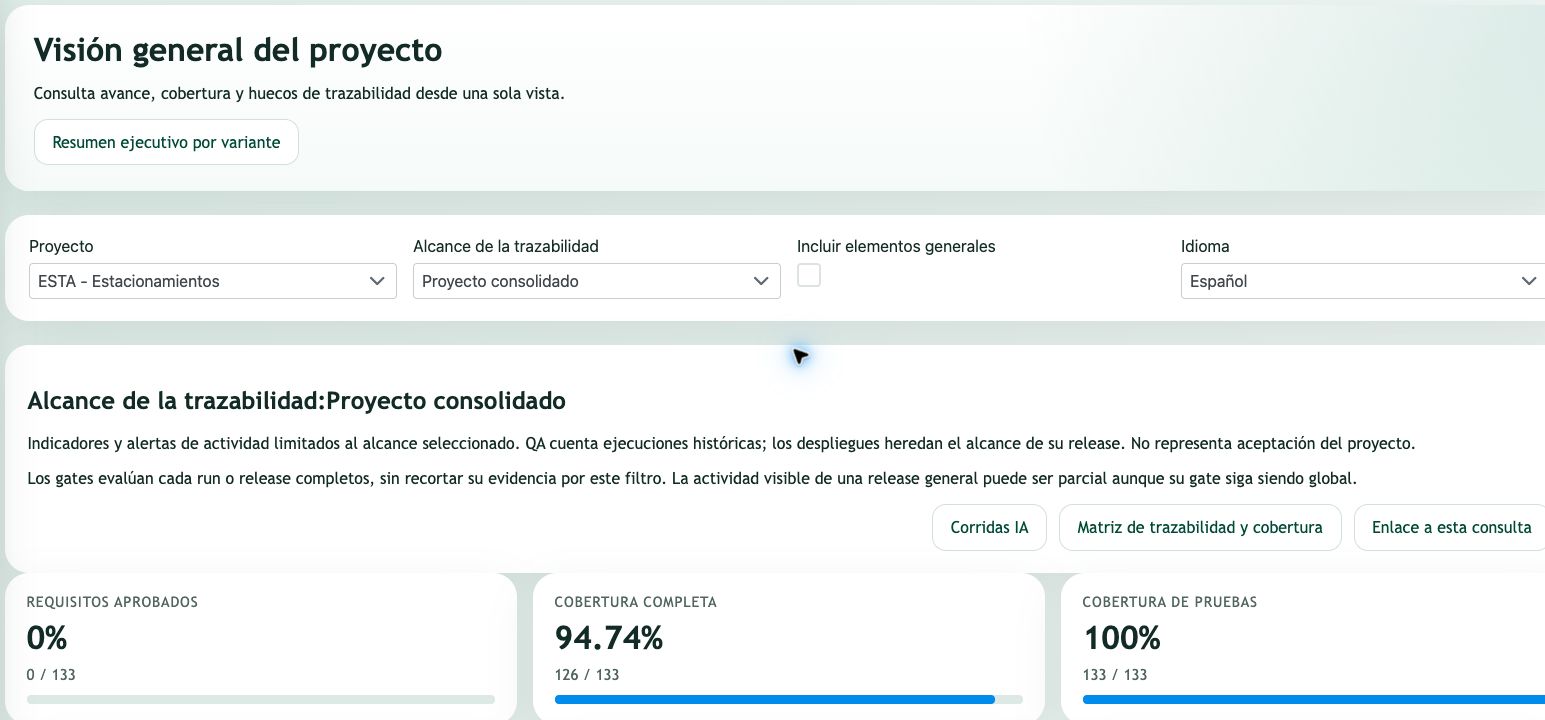
A repository explains how code changes. Orkenty adds the context of what is needed, how delivery is organized and what has been verified.
01 / REQUIREMENTS AND TRACEABILITY
Requirements that preserve the why.
Structure project needs and connect them to work and tests. Help product, engineering and quality review the same context.
- Organize requirements and their relationships within the project.
- Manage states and reviews through configured workflows.
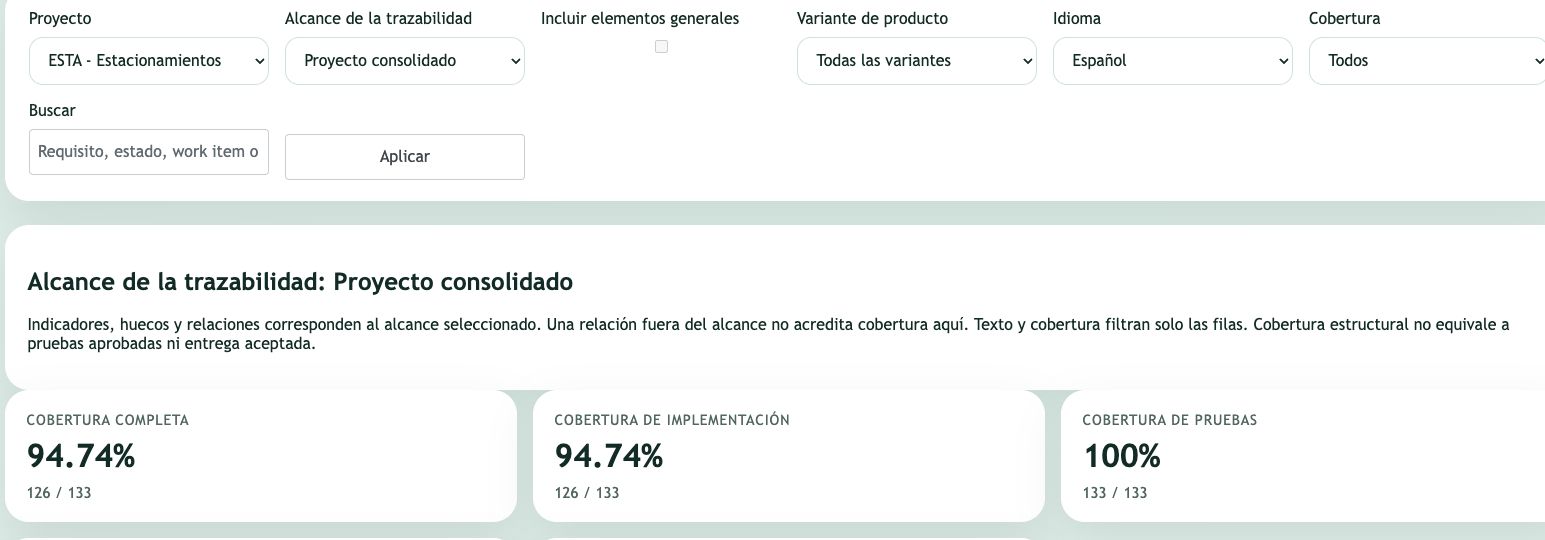
- Review linked QA coverage and distinguish design from results.
Explore Requirements and decisions ↗
How traceability is used
Start with the need and its acceptance criteria. Then connect the requirement to the work items that implement it and the test cases that check its behaviour. These relationships let the team follow context without relying on isolated documents or conversations.
Design coverage means a linked test exists. An execution result provides different evidence: what was run, within which scope and with what outcome. A relationship alone does not demonstrate that a requirement has been verified.
Example: a purchasing approval requirement links to its implementation story and tests for authorisation, rejection and amount limits. The team can review both outstanding work and available evidence.
02 / WORK AND PLANNING
Plan with project context.
Coordinate applications, teams and delivery through work items, boards and planning. Preserve the relationship between business priorities and the work being done.
- Organize work items using types, priorities and workflows.
- Plan sprints and releases within the project scope.
- Connect tasks to requirements and development evidence.
How work is organised
A project brings together shared context. Subprojects organise applications with their own items and planning while retaining the project view. Work items describe delivery work through types, priorities, assignees and workflow states.
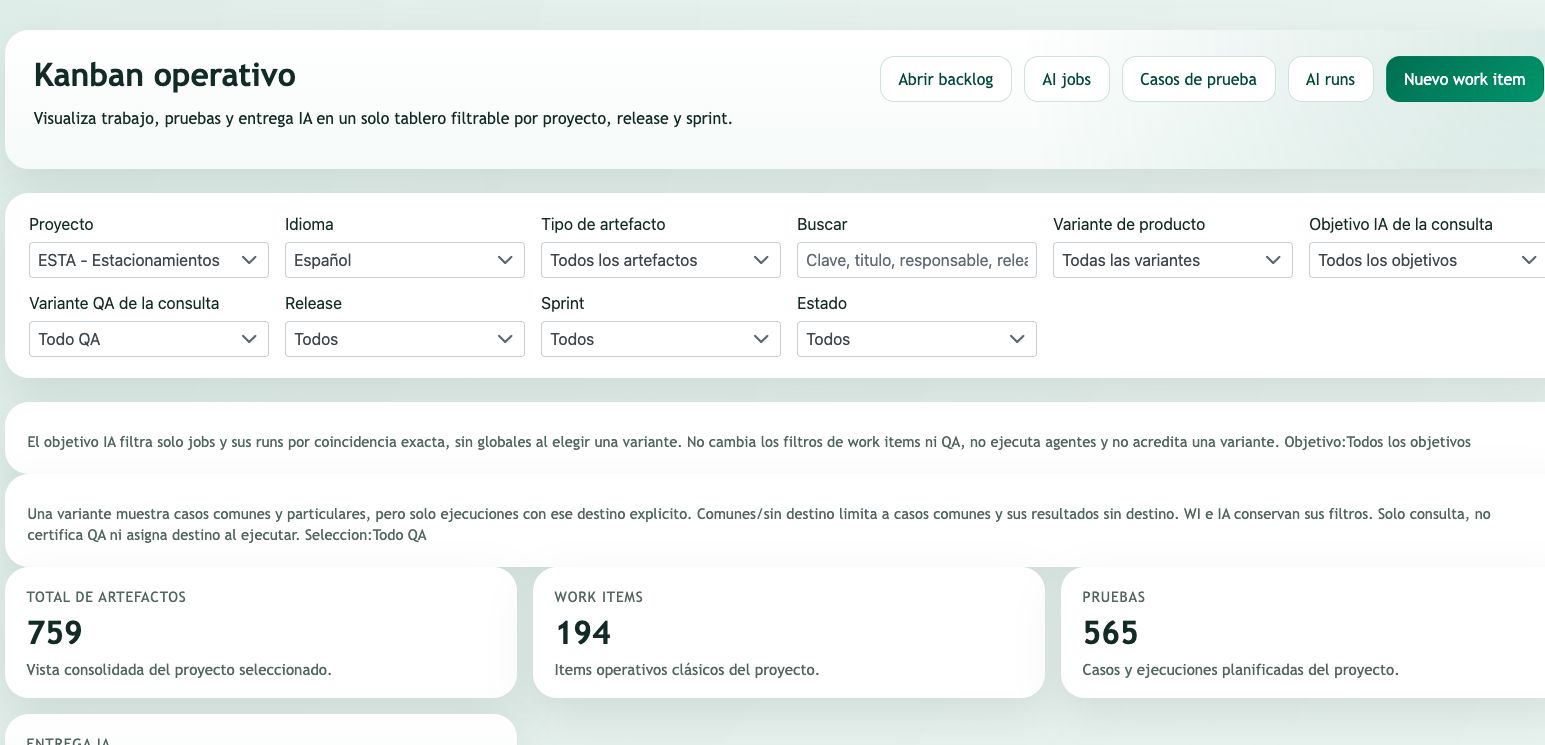
Releases and sprints place work within a delivery and a period. Boards support operational progress reviews; a card state should be read alongside its relationships and tests rather than automatically treated as an accepted delivery.
Example: coordinate an API and a web application in one project, keeping their tasks and delivery cycles while reviewing dependencies between them.
03 / QUALITY AND QA
Distinguish test design
from observed results.
Define what needs to be checked and record what was actually executed. Bring plans, suites, cases and results together to support your team’s review.
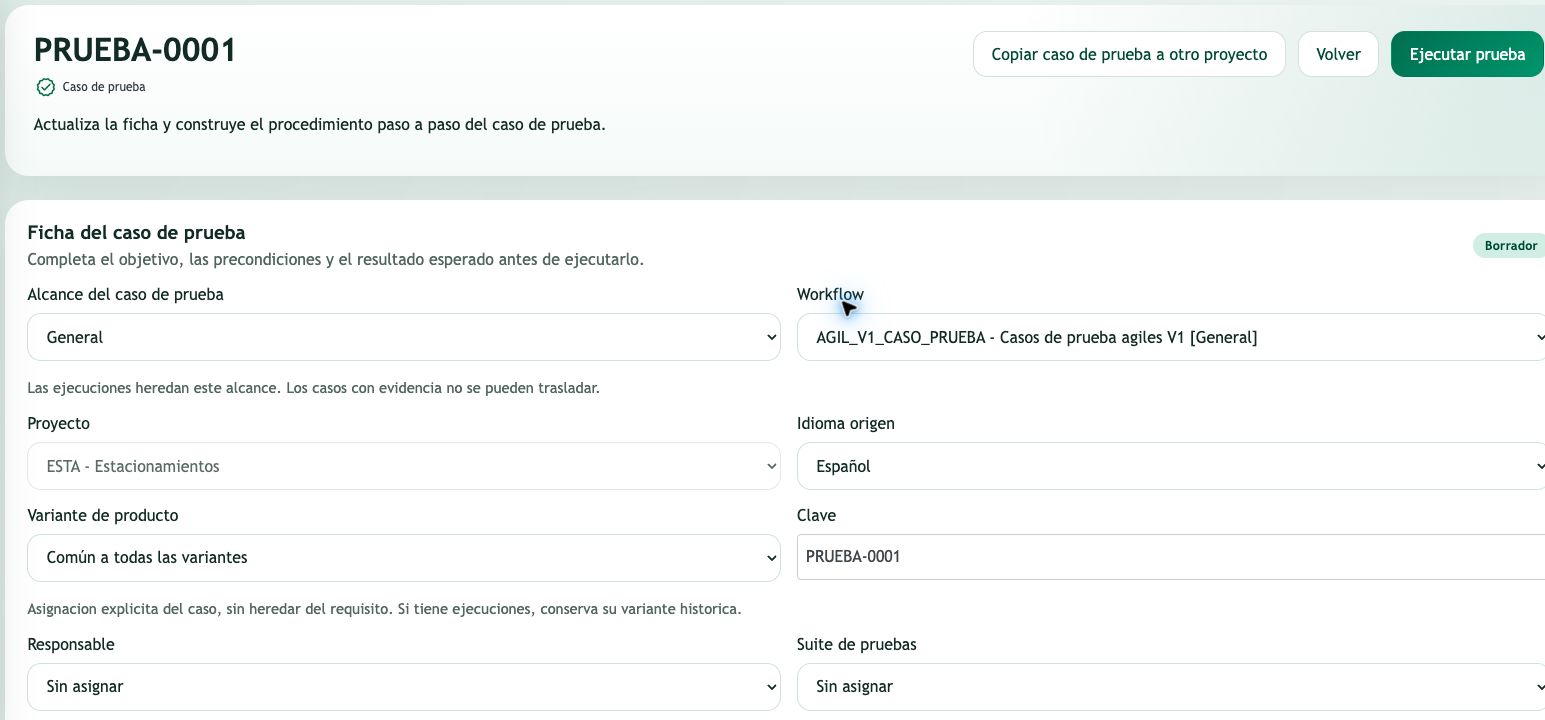
- Define test cases, plans and suites.
- Record manual or automated executions according to the integration.
- Review evidence applicable to the selected scope and variant.
From test design to execution results
A test case describes what to check; its steps and expected results help repeat the review. Plans and suites organise cases. An execution records the observed outcome separately from the current test design.
Variants distinguish product configurations. A common case can provide shared design, but an execution without a specified target does not verify every variant. Reviewing scope prevents unexecuted work from being interpreted as success.
Example: design an access test for two variants. A result recorded for one variant does not replace the execution still pending for the other.
04 / DOCUMENTATION AND BASELINES
Documentation as part
of the engineering process.
Work with project-connected documentation and preserve versions for review. A baseline fixes captured content; a live view reflects current information.
- Connect documents to project sources and evidence.
- Create baselines and manage review through the workflow.
- Export versions to PDF and Word from preserved content.
Explore Living documentation ↗
Live documents, baselines and review
A live document uses current project information. A baseline preserves content captured as a version; subsequent source changes should not be confused with what was reviewed in that version.
Workflows organise document review and approval. PDF and Word exports of a baseline use its preserved content. The existence of a file or its fingerprint does not replace approval or establish external certification.
Example: prepare the current specification, capture a baseline for review and consult that version after requirements or development have changed.
05 / RELEASES AND EVIDENCE
Delivery information
ready for review.
Bring release work, quality and relationships together in its dossier. Support review of available evidence without treating a collection of information as certification.
- Review the release inventory and relationships.
- Bring applicable QA results and execution evidence together.
- Review or export dossiers and versions according to permissions.
Explore Releases and traceability ↗
What a release dossier provides
The dossier brings together inventory, relationships, QA results and evidence associated with a delivery. It helps the responsible reviewer see what information exists and which gaps or outcomes need attention.
The current view reflects sources read at that time. Where supported by the installed version, a dossier capture preserves a version for later consultation. A document capture and the decision to accept a release are separate actions.
Example: before a delivery review, check related requirements, applicable tests and development evidence; retain a dossier version if you need to reference what was reviewed.
06 / AI AGENT GOVERNANCE
Context, permissions and review.
For AI too.
Bring providers and agents into a governed process. Configuration and enabled capabilities determine what can execute in each environment.
- Configure providers, agents, tools, skills and policies.
- Connect jobs and runs to their context and review results.
- Review reported consumption and preserve execution provenance.
How AI-assisted work is governed
A job defines work and a run represents an execution attempt. Its context, provider and result support review of what was requested and produced. Tool and skill registries and policies establish the usage framework according to current configuration and permissions.
AI packages group stories and their context. Review and QA provide evidence before results are accepted. Pause, concurrency and automatic advancement controls depend on the installed version and environment configuration; they do not imply universal autonomous execution.
Example: prepare a story with context and acceptance criteria, review the attempt result and check QA before accepting it. Reported consumption supports usage review without turning an estimate into an invoice.
TEAM ALIGNMENT
A shared foundation.
Three perspectives on delivery.
Product and analysis
Clarify requirements and priorities. See how they connect to work and test coverage.
Engineering and development
Coordinate work and connect Git, PR and CI evidence to its project context.
Quality and delivery leaders
Review plans, results and documentation to assess release evidence.
PRODUCT VARIANTS
One product.
Different needs, connected.
Manage a shared product core alongside variant-specific requirements, work and tests. Keep each edition’s scope visible within the same project.
- Define your own variants: editions, markets or customer configurations.
- Consult all artifacts, only common ones, or the common core plus one variant’s specific items.
- Review traceability, test design and applicable execution evidence in context.
From shared scope to variant-specific evidence
Create the variant catalog within a project, independently of its application subprojects. Classify a requirement or work item as common or specific to one variant. Editing a common item updates that shared record; it does not synchronise independent copies.
Test cases have explicit applicability. Execution evidence has its own target: an execution with no specified variant does not count as evidence for every variant. Traceability and supported documentary views distinguish test design coverage from observed results.
Use filtered views and documentation to review the selected scope, while frozen baselines preserve the information captured at their creation. Variants organise product applicability; they are not separate security boundaries and do not automatically generate code branches or deployments.
Variant names are defined by your team. Available views depend on the installed version and enabled capabilities. The example illustrates scope management, not country-specific functionality supplied out of the box.
CONNECT YOUR ECOSYSTEM
Connect the tools
your team already uses.
Review the providers, credentials and workflows you need during the demo. A configured integration contributes evidence; it does not imply unlimited compatibility.
Autonomous Codex execution remains under laboratory validation. The examples on this page describe workflows to evaluate, not guarantees of automation or compliance.
A CONVERSATION ABOUT YOUR ENGINEERING
See Orkenty in the context
of your team.
Tell us what you need to connect. We will prepare a demonstration focused on your requirements, quality processes and delivery workflow.
Business contact:
info@orkenty.com