
02 / Work and planning
Organise delivery.
Keep the context of every task.
Connect backlog, workflows, Kanban, sprints and releases to project requirements. Place each activity within its application, priority and delivery cycle.
FUNCTIONAL SCOPE
What you can manage with Orkenty.
Structured backlog
Manage work items with type, priority, assignee and description. Keep criteria and relationships so that work has a visible purpose.
States and workflows
Configure progress through states and transitions. Required-field rules can adapt the information needed to state, type and priority.
Sprints and releases
Associate work with periods and deliveries. Planning validates scope compatibility to avoid accidentally mixing items from different applications.
Operational Kanban
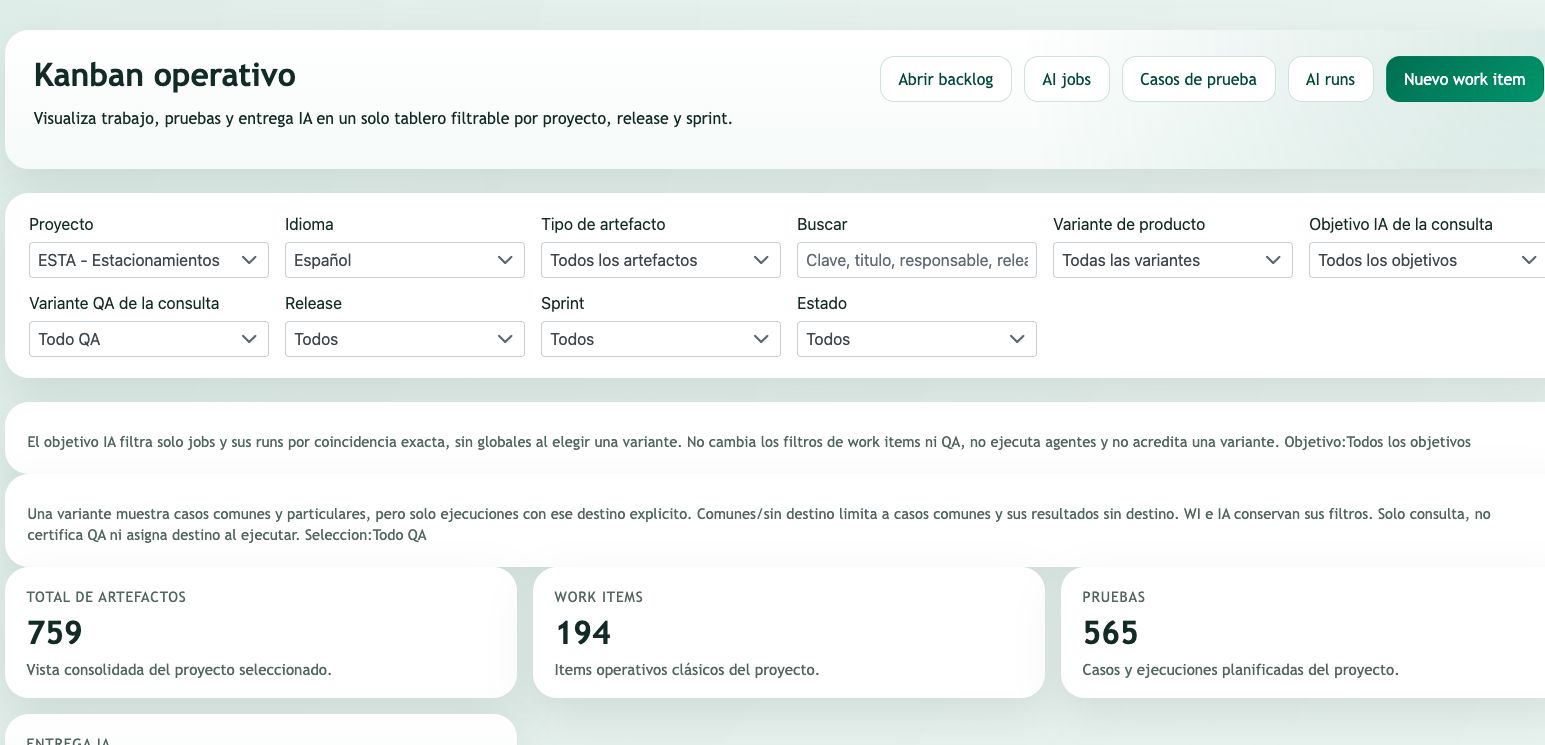
Review work, tests and AI delivery through filters. Cards gather operational context without losing their project reference.
From a need to an actionable backlog
Work items turn needs into units the team can prioritise, assign and review. Type distinguishes the nature of each item while its workflow defines the operational journey.
Descriptions and criteria explain expected work. Links to requirements and tests place activity within a need and a way to validate it. The backlog becomes a coordination point for product, engineering and quality.
Planning by project and application
Subprojects organise applications within a project. Requirements, work and planning retain their scope; general items can provide shared context where applicable.
Releases and sprints provide delivery and period references. Sprint calendar dates and initial/final work assignments describe the planned journey. Planning alone does not demonstrate that functionality has been delivered or accepted.
Visibility for team conversations
Kanban provides a state-based view with project, release, sprint and other available filters. Work can be examined alongside its type, assignee and operational references.
Advancing an item must respect permitted transitions and their rules. An operational state does not replace technical review or QA outcomes; both need to be read within their context.
A PRACTICAL JOURNEY
From setup to team review.
Break down scope into work items and priorities.
Assign owners and review the applicable workflow.
Plan compatible releases and sprints.
Review the board and compare progress with tests and evidence.
ILLUSTRATIVE USE CASE
Put the capability in context.
A delivery includes an API and a web application. Each application retains its own work and planning while the project gathers shared context. The team reviews dependencies and criteria without losing each part’s scope.
Available actions depend on installed version, enabled integrations and current permissions. Review your specific journey in a demonstration. The example is illustrative and is not a customer testimonial.
COMMON QUESTIONS
Understand the scope.
Can states match my team’s process?
Workflows define states and transitions. Available rules can require information at the appropriate points in the journey.
Does a completed card mean an accepted delivery?
Not necessarily. Work state and delivery acceptance are separate decisions that must be checked against QA and evidence.
Do board filters execute agents?
Query filters organise visible information. Viewing a board does not itself authorise or execute AI work.
Explore the other platform areas.
A CONVERSATION ABOUT YOUR ENGINEERING
See Orkenty in the context
of your team.
Tell us what you need to connect. We will prepare a demonstration focused on your requirements, quality processes and delivery workflow.
Business contact:
info@orkenty.com